
imtoken Multi-chain Wallet
Manage Multi-chain Assets and Connect to Web3 with Clarity
A multi-chain wallet, blockchain network and Web3 knowledge hub from imtoken
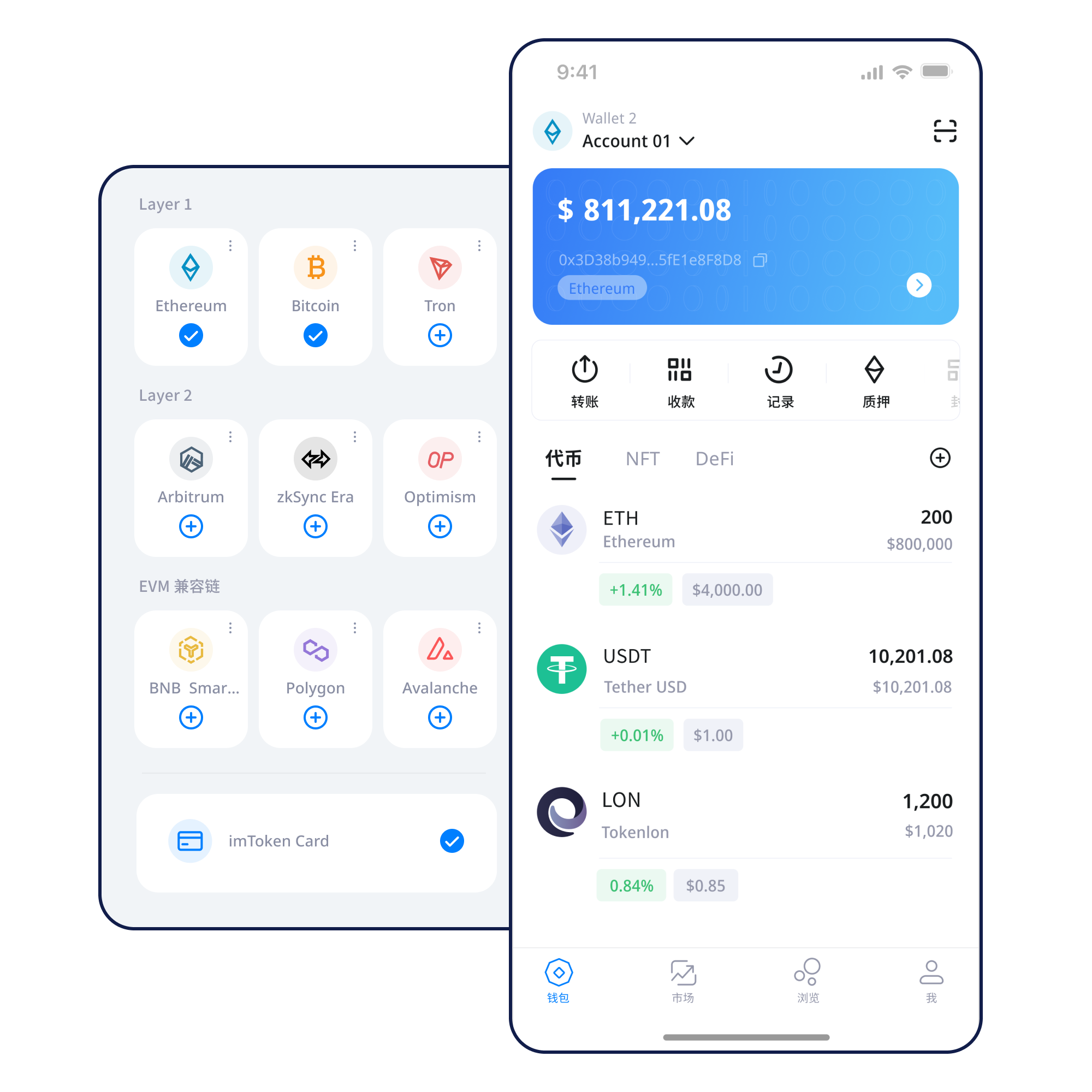
Move from multi-chain asset management and network selection to receiving, sending, DApp connections, signatures and token approvals with a clearer understanding of what each request means. Before transferring, signing or approving, review the network, address, fee and permission scope, and make wallet security part of the everyday workflow.
Common tasks
Start with what you need to do now
Complete one clear task, then learn the address, network, backup or signature concept behind it.
Wallet capabilities
Assets, networks and security belong in one workflow
imtoken organizes wallet capabilities around real decisions: confirm the network, manage the asset, then verify the transaction and permissions.
Multi-chain Assets
Managing assets across networks requires an understanding of chain differences, address compatibility and confirmation behavior.
imtoken App
Review assets, switch networks, inspect transaction history and understand requests before connecting to Web3 services.
Send & Receive
Receiving requires address and network checks. Sending adds amount, gas and destination support, followed by transaction-hash verification.
imtoken Web
Account connection, message signing, transaction signing and token approvals must be evaluated separately.
Wallet Security
Keep seed phrases and private keys offline and under your own control. imtoken support will not ask you to send them.
Multi-chain
Start by asking where the asset actually lives
The goal is to make the current chain, destination chain, fee model and confirmation rules understandable before action.
Explore multi-chain networks →Public Chains
Understand transactions through nodes, blocks and confirmations
Public chains use nodes to validate and record transactions, while explorers expose public status and confirmation data.
Public-chain fundamentals →
EVM
Compatible execution does not mean identical networks
EVM networks can share account and contract patterns while using different chain IDs, gas assets and ecosystems.
Learn about EVM networks →
Layer 2
Understand scaling, bridges and exit paths
Cross-layer movement may introduce bridges, waiting periods and base-chain settlement.
Learn Layer 2 basics →
Gas & Confirmations
Fees are only one part of transaction status
After submission, use the transaction hash and confirmation state to verify progress.
Gas and confirmation guide →Wallet journey
Six steps with a clear check at each stage
Every stage maps to a security action: back up, verify, inspect or manage permissions.
Get imtoken
Use a trusted entry point and never type sensitive credentials into unfamiliar pages.
Create or Import
Understand that control comes from the seed phrase and private key, not from a website account.
Back Up Offline
Keep the seed phrase offline and never send the private key to another person.
Select the Network
Confirm the asset’s current chain and the intended destination before receiving or sending.
Receive or Send
Review address, network, amount and gas before submitting a transfer.
Review Transactions & Approvals
Use transaction hashes to verify on-chain results and remove approvals you no longer need.
Web3 & DApps
Connecting a wallet does not mean approving every request
Separate access, connection, signatures, approvals and final transactions so you can see how permissions change at each step.
Open the Web3 guide →- Visit the DApp
- Verify the domain
- Start the connection
- Review account access
- Inspect the signature or approval
- Complete the action
- Disconnect sessions you no longer need
Connecting a wallet does not mean you should accept every signature request. Review every signature and approval independently.
Security
Durable security comes from repeatable checks
Seed phrases and private keys remain under the user’s control, and imtoken support will not ask for them. Public devices, open networks, unknown extensions, remote-control tools, fake support, fake airdrops and look-alike domains can all increase risk. Verify the address, network and amount before transfers; review the domain, signature content, contract and approval scope before DApp actions. Blockchain transactions are generally not reversible by the wallet alone.
Open the Security Center →Back up seed phrases offlineNever disclose private keysCheck network and addressRead signature requestsManage DApp approvals
Academy
Turn concepts into practical on-chain decisions
Each article is built around a real question rather than a category summary.
What Should You Understand Before Using a Digital Wallet?
Addresses identify public receiving locations; seed phrases and private keys represent control; networks define where assets exist; gas explains transaction cost; transaction hashes provide a public verification trail; and DApp connections, signatures and approvals define Web3 permission boundaries.
Read the beginner guide →NetworksPublic Chains & ConfirmationsFrom nodes and blocks to confirmation status.ContractsEVM & Smart ContractsGas, tokens and approvals.ScalingLayer 2 BasicsBase chains, bridges and cross-layer transfers.Web3DApp ApprovalsCheck contracts and permission scope.SecurityWallet SecurityTurn careful checks into everyday habits.GlossaryBlockchain GlossaryUnderstand the core terms quickly.
Ethereum & PoS
Understand the mechanism before deciding whether to participate
The focus is on validators, exit mechanics and risk—not promotional yield claims.
Ethereum Staking Basics
Ethereum PoS uses validators to participate in consensus. Reward sources, network conditions, withdrawal mechanics and exit processes can all affect the experience, and rewards are not fixed.
Learn Ethereum staking →Know Before Participating
Validators can face network penalties; exits may involve waiting periods; smart contracts and third-party services add risk; and digital-asset prices fluctuate.
Learn about PoS and validators →Product & Security Updates
Updates should be explainable and verifiable
FAQ
Common questions
No. Keep both under your own control and never send them to another person.
Compatible networks can use similar address formats while still being separate chains.
It can be used in a block explorer to verify status, block data, addresses and confirmations.
No. Rewards can vary, exits may take time, and network, contract, service and market risks remain.
No. Connection, message signatures, transaction signatures and token approvals are separate requests that should be reviewed independently.
Confirm where the asset currently exists, that the destination supports the exact Layer 2 network, and whether a bridge is required.
Get started
Open the imtoken download entry
Download actions use the official download page.